Getting started
Orvix Admin is one resource, orvix_admin. It runs on ESX Legacy or QBCore, creates its own database tables, and gives your staff a 12-page panel in game.
Requirements
ESX Legacy 1.12+ or QBCore. Detected automatically.
Database and callbacks. Tables are created for you.
On by default with txAdmin. Needed for the live map and Near you.
Screenshots for bans, alerts and reports (with a FiveManage token).
Voice mute.
ox, qs, qb or ESX inventory; illenium, fivem-appearance, qb-clothing or esx_skin.
Installation
Copy the folder
Put
orvix_adminin yourresourcesfolder and keep that exact name.Add it to server.cfg
After your framework, oxmysql and ox_lib:
ensure orvix_adminTurn off your old admin menu
Two admin menus fight over the same keys and commands. Comment out the old one.
Make yourself owner
Add your license to
Config.Owners(see the next section).Start the server
The console shows
[orvix_admin] framework: ESX LegacyorQBCore. Join and press F9.
Make yourself owner
Join your server once, then find your license in the server console (or in txAdmin under Players). Put it in config.lua:
Config.Owners = {
  'license:1a2b3c4d5e6f7a8b9c0d1e2f3a4b5c6d7e8f9a0b',  -- you
}
Owners can do everything and can't be removed in game. Give everyone else a rank from Staff & ranks in the panel.
Ranks & permissions
There are four ranks out of the box: Helper, Moderator, Admin and Owner. In Staff & ranks, flip switches to decide what each rank can do. Changes apply right away, no restart.
- A lower rank can never warn, kick, ban, freeze or teleport a higher rank.
- Bans longer than 7 days, unbans, giving money and editing ranks are Admin and Owner by default.
- Turn on Discord role sync to give ranks automatically from Discord roles.
Using the panel
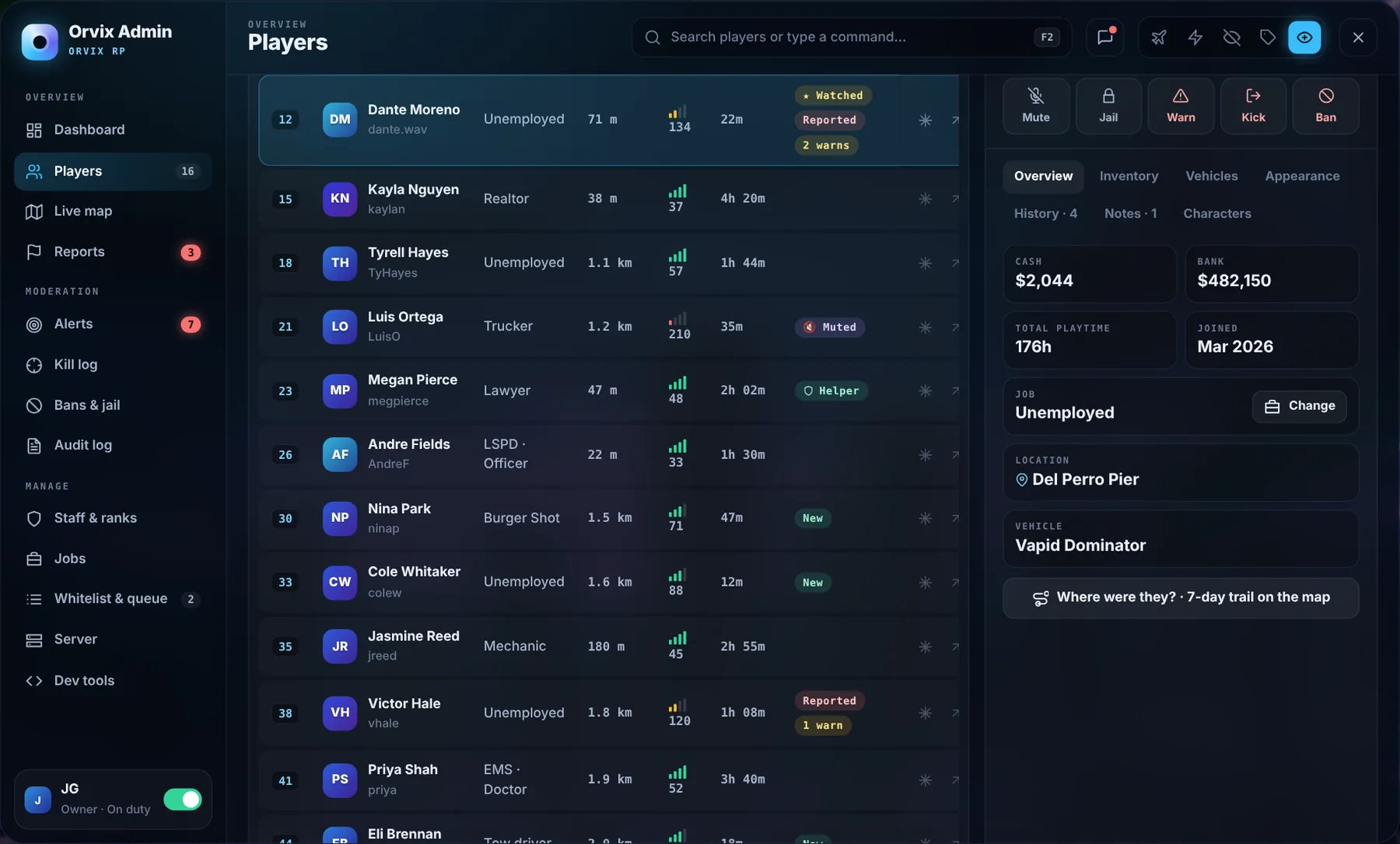
Press F9. The sidebar has every page; the top bar has F2 search, staff chat and your own tools (noclip, god mode, invisible, IDs over heads, look-at card).
| Page | What it's for |
|---|---|
| Dashboard | Players online, open reports, staff on duty, activity, quick actions, things that need attention |
| Players | Near you, filters, watchlist, offline players and a full profile with 15 actions |
| Live map | Everyone on the map, with a 7-day trail per player |
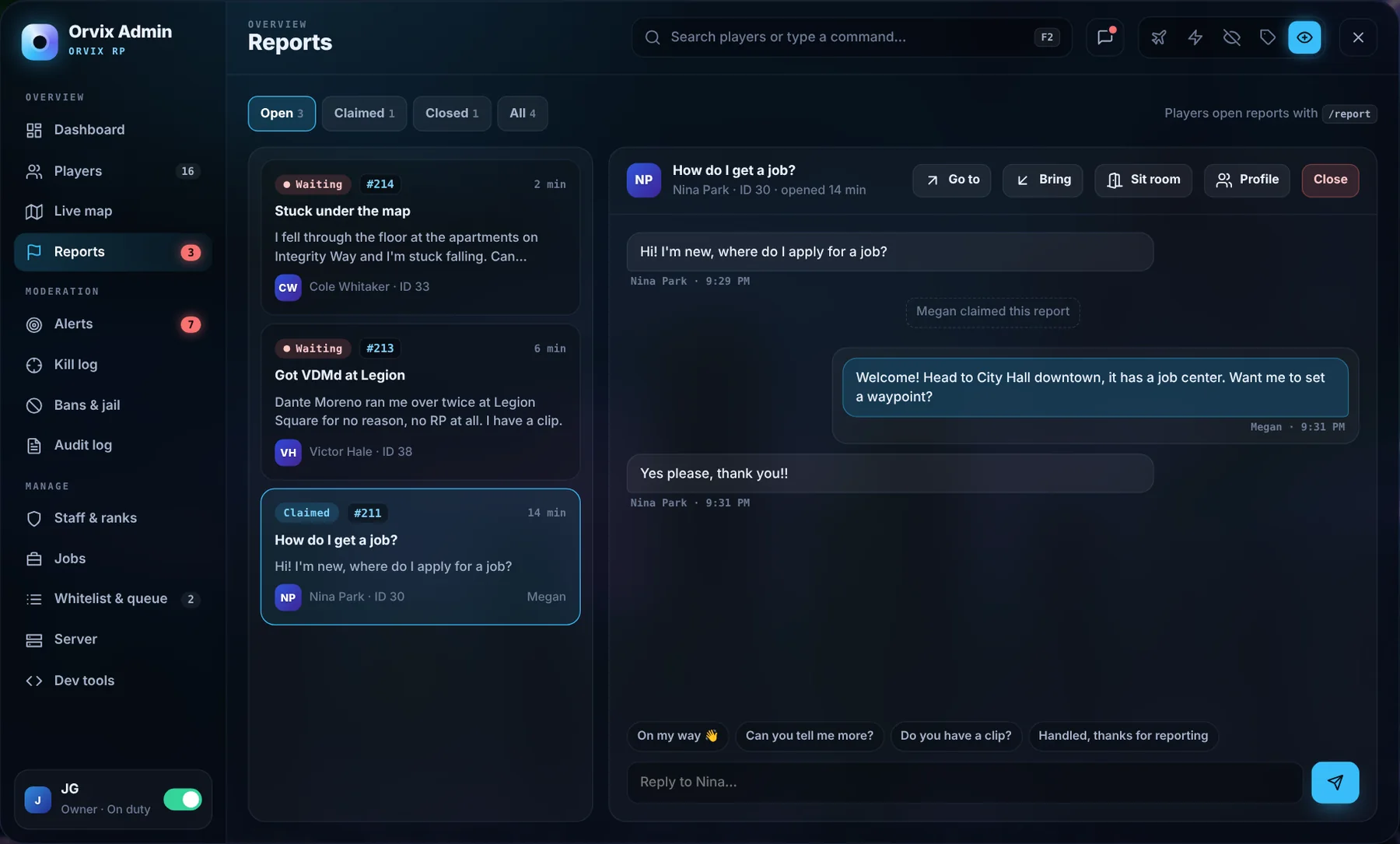
| Reports | Claim, chat, go to, bring, sit room, close |
| Alerts | Cheat alerts, rich list, watch rules, automatic punishments, staff watch |
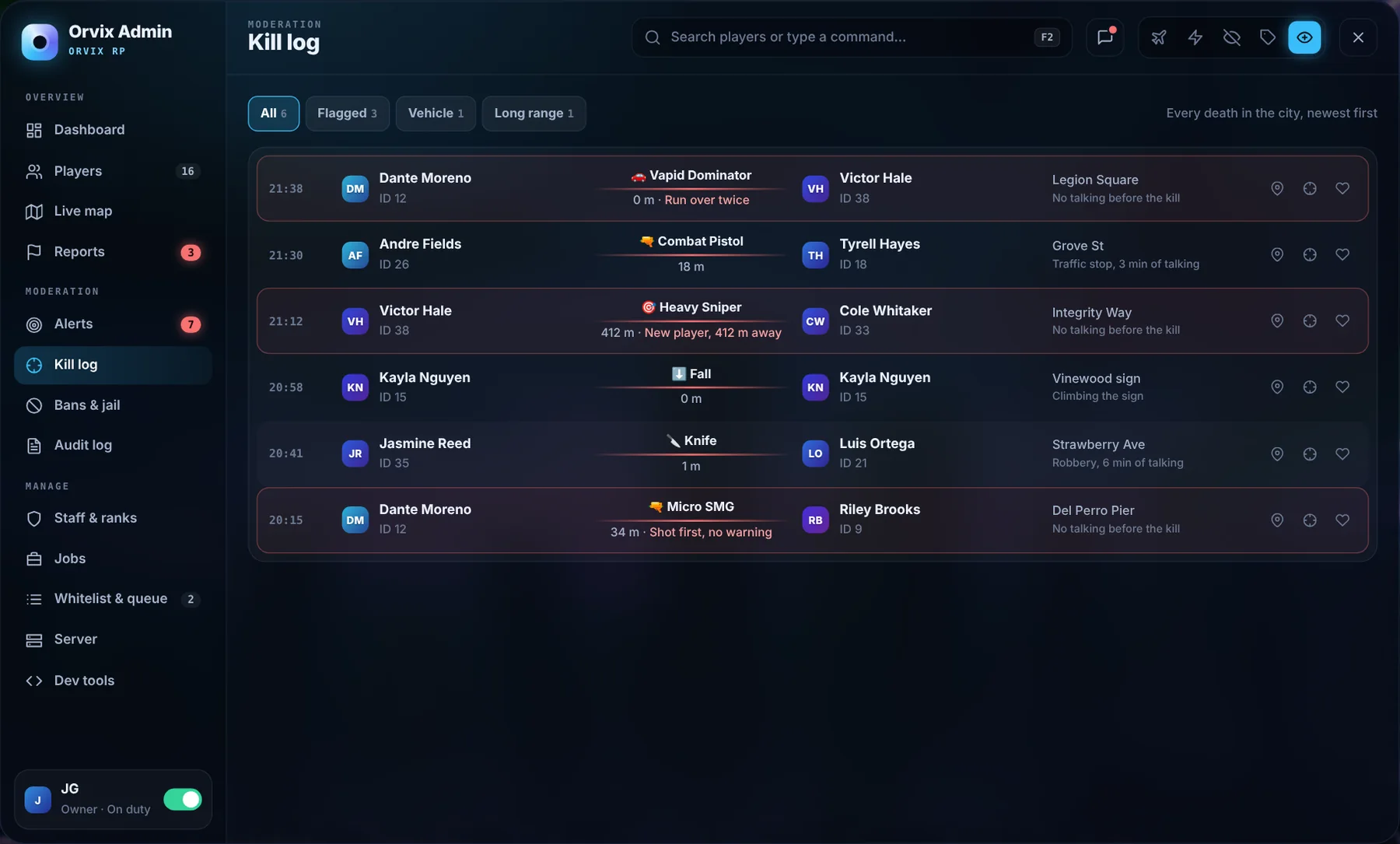
| Kill log | Every death with weapon, distance and flags |
| Bans & jail | All bans with evidence, plus who is jailed or doing community service |
| Audit log | Every staff action, searchable |
| Staff & ranks | Staff hours and ratings, punishment guide, Discord sync, permissions |
| Jobs | Company money, grades, pay and employees |
| Whitelist & queue | Applications, queue and VIP priority |
| Server | Weather, time, traffic, restarts, cleanup, resources, console |
Commands & keys
Everything in the panel also works as a command. The last column is the permission needed.
| Command | What it does | Permission |
|---|---|---|
/admin | Open the panel (or press F9) | Any staff |
/report [message] | Open a report for staff | Everyone |
/goto [id] | Teleport to a player | teleport |
/bring [id] | Bring a player to you | teleport |
/tpm | Teleport to your map waypoint | teleport |
/freeze [id] | Freeze or unfreeze a player | freeze |
/revive [id | all] | Revive one player or everyone | revive |
/heal [id] | Heal a player | revive |
/spectate [id] | Spectate a player | spectate |
/warn [id] [reason] | Warn a player | warn |
/kick [id] [reason] | Kick a player | kick |
/ban [id] [1h|1d|3d|1w|30d|perm] [reason] | Ban a player | ban |
/unban [ban id] | Lift a ban | unban |
/jail [id] [minutes] [reason] | Send to admin jail | jail |
/unjail [id] | Release from jail | jail |
/mute [id] [minutes] | Mute voice and chat | mute |
/sitroom [id] | Pull a player into the sit room | teleport |
/noclip | Toggle noclip (or F10) | noclip |
/ids | Show names and IDs over heads | Any staff |
/sc [message] | Message all staff | Any staff |
/announce [text] | Announcement to everyone | announce |
/duty | Go on or off staff duty | Any staff |
| Key | What it does |
|---|---|
| F9 | Open or close the panel |
| F2 | Command search (inside the panel) |
| F10 | Noclip |
| Left Alt (hold) | Look-at card on the player you aim at, then F freeze, G go to, B bring, E profile |
| ← → | Next or previous player while spectating |
| Esc | Close a window, stop spectating, close the panel |
Reports
Players type /report [what happened]. On-duty staff get a notification, and the report shows on the Reports page. Claim it, then chat with the player right in the panel. When you close it, the player can rate the help from 1 to 5 stars.
Bans, jail & mute
- Ban: pick an offense and the punishment guide suggests a length based on their record. Turn on Attach a screenshot to save evidence. Bans save every identifier, including hardware tokens.
- Jail: a locked room with a countdown (5 to 60 minutes) or community service (10 to 100 tasks). Relogging doesn't reset it.
- Mute: voice, text chat or both, for a few minutes or until they relog.
- Offline: warn, jail or ban someone who already left; it applies when they join.
Set your server's punishments in Config.Guide:
Config.Guide = {
  { offense = 'RDM',  steps = { 'Warn', 'Jail 15 min', 'Ban 1 day', 'Ban 7 days' } },
  { offense = 'VDM',  steps = { 'Warn', 'Ban 1 day', 'Ban 3 days', 'Ban 7 days' } },
  { offense = 'Cheating', steps = { 'Permanent ban' } },
}
Alerts & staff watch
The server watches for things that shouldn't happen and posts an alert with Spectate, Screenshot, Freeze and Ban buttons. Limits live in Config.Watch and can also be changed on the Alerts page.
Config.Watch = {
  MoneyJump = 100000, MoneyMinutes = 5,   -- alert if money rises this much this fast
  ItemsAtOnce = 100,                     -- one item, this many at once
  StaffEvents = true,                    -- non-staff triggering staff-only events
  StaffSelfGive = true,                  -- staff giving themselves money or items
  MinReasonLength = 12,                  -- flag lazy ban reasons
}
Config.Escalation = { { warns = 3, ban = '1d' }, { warns = 5, ban = '1w' } }
Staff watch is a second tab only owners see. Each flag has Undo it, Ask them and It's fine.
Live map & kill log
The map updates every 2 seconds. Positions are read on the server, so they can't be faked. Trails are kept for Config.Map.TrailDays (7 by default). The kill log records every death with weapon, distance, location and whether the two players talked first, and flags suspicious ones.
Whitelist & queue
With the whitelist on, new players see your application questions when they connect and wait for approval. The queue lets priority players (staff, Discord roles, supporters) skip the line; give priority by hand on the Priority tab with an expiry date.
Discord & screenshots
All optional. Add these to server.cfg. Always use set, never setr.
# staff action logs
set orvix_admin_webhook "https://discord.com/api/webhooks/..."
# Discord role sync (bot in your Discord with the Server Members intent)
set orvix_admin_discord_token "your-bot-token"
set orvix_admin_guild "your-server-id"
# screenshots for bans, alerts and reports
set orvix_admin_fivemanage "your-fivemanage-token"
setr sends the value to every player's game, including your bot token.Configuration
Everything lives in config.lua. Ranks, watch limits and the punishment guide can also be changed in the panel.
| Option | Default | What it does |
|---|---|---|
Config.Framework | 'auto' | 'auto' detects qb-core or es_extended. Force with 'esx' or 'qb' |
Config.OpenKey | 'F9' | Opens the panel. Staff can rebind it in Key Bindings › FiveM |
Config.Owners | { } | License IDs that are always Owner. Everyone else gets a rank in the panel |
Config.Ranks | table | Rank names, colors and order (helper, mod, admin, owner by default) |
Config.NoclipKey | 'F10' | Noclip toggle for staff with the noclip permission |
Config.LookAtKey | 'LMENU' | Hold to show the look-at card (Left Alt) |
Config.Report | table | Cooldown, max open reports per player, quick replies, ratings on/off |
Config.Jail | table | Jail room and community service park coordinates, task count options |
Config.SitRoom | vector4 | Where staff and the player go for a private chat |
Config.Guide | table | Offenses and the punishment for 1st, 2nd, 3rd and later times |
Config.Watch | table | Alert limits: money jump, items at once, speed, staff self-give, reason length |
Config.Escalation | table | Automatic punishments by warning count |
Config.Map | table | Update rate (2 s default) and how many days of trail to keep |
Config.Whitelist | table | On/off, application questions, minimum age |
Config.Queue | table | Priority levels and who gets them (ranks, Discord roles, manual) |
Config.Restarts | table | Daily restart times and warning minutes |
Config.Logs | table | Which actions go to which Discord webhook |
Works with
| Resource | What Orvix Admin does with it |
|---|---|
orvix_characters | CK a character from the profile; see all of a player's characters |
orvix_pulse | See a player's phone number in reports and profiles |
ox_inventory · qs-inventory · qb-inventory | Inventory tab: view, remove and give items |
illenium-appearance · fivem-appearance · qb-clothing · esx_skin | Appearance tab: clothing menu, reset, reload skin |
pma-voice | Voice mute |
screenshot-basic | Evidence screenshots |
| txAdmin | Runs alongside it; txAdmin still handles starting and stopping the server |
Exports
Let your other scripts check staff, log actions or raise alerts.
exports.orvix_admin:IsStaff(source)                     -- true / false
exports.orvix_admin:GetRank(source)                     -- 'helper' | 'mod' | 'admin' | 'owner' | nil
exports.orvix_admin:HasPermission(source, 'ban')
exports.orvix_admin:AddLog(source, 'money', 'Paid out $5,000 lottery win')
exports.orvix_admin:SendAlert(source, { title = 'Bank exploit?', text = 'Withdrew 3x in 1s', severity = 'high' })
exports.orvix_admin:Ban(target, '1d', 'Exploiting the bank job')
exports.orvix_admin:IsOpen()
exports.orvix_admin:IsNoclipping()
Troubleshooting
F9 does nothing
Only staff can open the panel. Check your license is in Config.Owners, or that an owner gave you a rank. Also check you didn't rebind the key in Key Bindings › FiveM.
Console says "framework: none"
Orvix Admin started before your framework. Put ensure orvix_admin after es_extended or qb-core.
The live map is empty
Turn on OneSync (txAdmin › Settings › FXServer). Without it the server can't read player positions.
Screenshots don't attach
Start screenshot-basic and set orvix_admin_fivemanage with set, then restart.
Discord ranks don't sync
The bot must be in your Discord with the Server Members intent on, and orvix_admin_guild must be your server ID.
FAQ
Can I rename ranks or add more?
Yes, in Config.Ranks. The panel picks them up on restart.
Does it work without Pulse or Orvix Characters?
Yes. Those are optional; their buttons just stay hidden.
Where is data stored?
In your own database through oxmysql: bans, warnings, notes, reports, logs and trails. Nothing leaves your server unless you add a Discord webhook.